
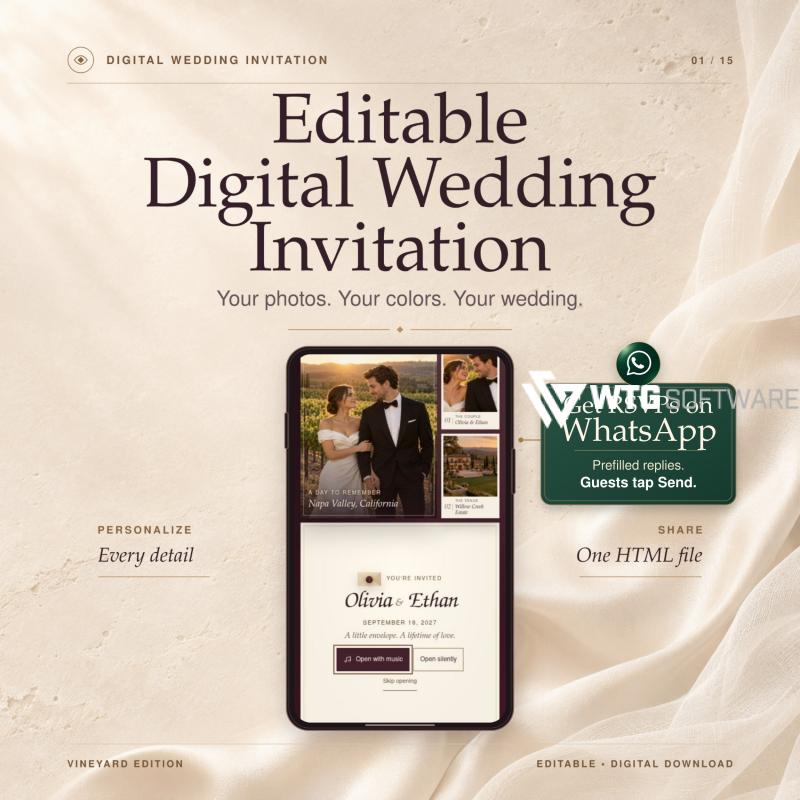
The envelope opens. Your photos appear. The day you say “I do” feels a little closer.
This editable digital wedding invitation pairs an animated envelope with your photos, a live wedding countdown, and a built-in RSVP form. It has the feel of a one-page wedding website, and it comes in a single HTML file guests can open offline. Add your own song to the opening or let guests enjoy it silently.
No Canva Needed. Your Invitation, Your Way.
-
Edit right in your browser. Open
EDIT-INVITATION.htmland customize your names, wedding date, photos, colors, and music. No Canva account or Canva Pro required. -
One purchase. Free to edit. Make changes as often as you like. There are no editing fees, subscriptions, or hosting costs.
-
Yours to keep and share. Download your finished invitation as a single HTML file and send it to your guests. They can open the downloaded file offline in a compatible browser.
First, download the ZIP and extract all the files on your computer.
Option 1: Edit directly in your browser — the easiest way
-
Double-click
EDIT-INVITATION.html. The editor opens in your browser. No launcher is needed. -
Personalize your names, wedding date, venue, photos, colors, and music.
-
Click Download Invitation to create a new HTML file. Send that file to your guests.
Option 2: Save changes to your existing index.html
-
On Windows, open
START-EDITOR.cmd. On Mac, openSTART-EDITOR.command(requires Python 3). -
The same editor opens in your browser. Make your changes and click Save Changes to update
index.htmlin your folder. -
When you’re ready to share, click Download Invitation to create a separate HTML file for your guests.
Your wedding RSVPs land right in your WhatsApp chat.
Create a digital wedding invitation with WhatsApp RSVP, so guests can respond without hunting for your number or writing a message from scratch. They fill out the RSVP form, review a prefilled WhatsApp message addressed to you, and tap Send.
HOW WHATSAPP RSVP WORKS
-
Add your WhatsApp number. Choose your country or region from a searchable list with country flags. Enter your phone number, and the editor adds the country calling code automatically. Your number appears next to the wedding RSVP form.
-
Let guests respond. They select “Joyfully Accepts” or “Regretfully Declines,” enter their name, and add a guest count if they’re attending. They can also leave a note.
-
Get the reply in your chat. Guests select Send Reply on WhatsApp. A chat with you opens with their response already filled in. They review it and tap Send. Each message includes the wedding date and wedding venue, so you have the details when you update your guest list.
GIVE THEM AN INVITATION WORTH OPENING
-
An animated envelope sets the scene. A photo collage gives guests a first look at the two of you and the place you’ll celebrate. Create a wedding invitation with music by uploading your own MP3 or using the included instrumental track. Guests choose whether to listen.
-
Your favorite photos tell the story. Make it a photo wedding invitation with five or more pictures in a scrolling filmstrip. Guests can tap a frame for a closer look. Add your engagement photos and at least three venue photos to show guests where you’ll celebrate.
-
Your colors make it yours. Pick any primary and accent shades to match your wedding color palette. Add your full names, a custom monogram, and your own wedding invitation wording. Adapt the vineyard wedding design for a garden wedding, an intimate wedding, or a destination wedding.
-
Keep the big day’s details together. Set a live wedding countdown using your venue’s time zone. Add the venue address, dress code, and RSVP deadline. Use the wedding day timeline to guide guests from the wedding ceremony to the wedding reception.
EDIT IN YOUR BROWSER. NO CANVA REQUIRED.
-
Download and extract the ZIP. Double-click
EDIT-INVITATION.htmlon your computer. Customize the wedding invitation template in the browser editor and see your changes in the live preview. No Canva account, coding, or editing subscription is required. -
Click Download Invitation. Export a single HTML wedding invitation named after the couple, with your photos, fonts, and music built in. If you also want to update the original
index.html, open the editor with the included Windows or Mac launcher and click Save Changes. The Mac launcher requires Python 3. -
Share your digital wedding invite. Send the HTML file as an attachment through WhatsApp or email. Guests download it and open it in a compatible browser or viewer that supports JavaScript.
CAN GUESTS OPEN IT OFFLINE?
Yes. This offline wedding invitation looks like a one-page wedding website and needs no web hosting. Once guests download it, they can view it without Wi-Fi or mobile data. Sending a reply through WhatsApp requires internet access and a WhatsApp account.
WHAT YOU’LL RECEIVE
Your digital download includes the editable template, browser editor, setup guide, sample photos, and instrumental music. Edit and export your paperless wedding invitation as often as you like at no extra cost. No physical item will ship. AI assisted in developing the template and creating the sample photos.
Make your animated wedding invitation yours, add your number, and let the replies come to you.


